Drag and Drop Email Builder For Airtable
Crafting professional emails doesn’t have to be a daunting task filled with complex coding or juggling through multiple tools. With Basemailer’s drag and drop email builder, you can effortlessly design responsive and eye-catching branded emails right within Airtable, using an intuitive visual editor.
Whether you are sending out newsletters, outreach campaigns, customer updates, or any other internal communications, Basemailer makes it easier to create, personalize, and send emails, all without leaving your Airtable email builder.
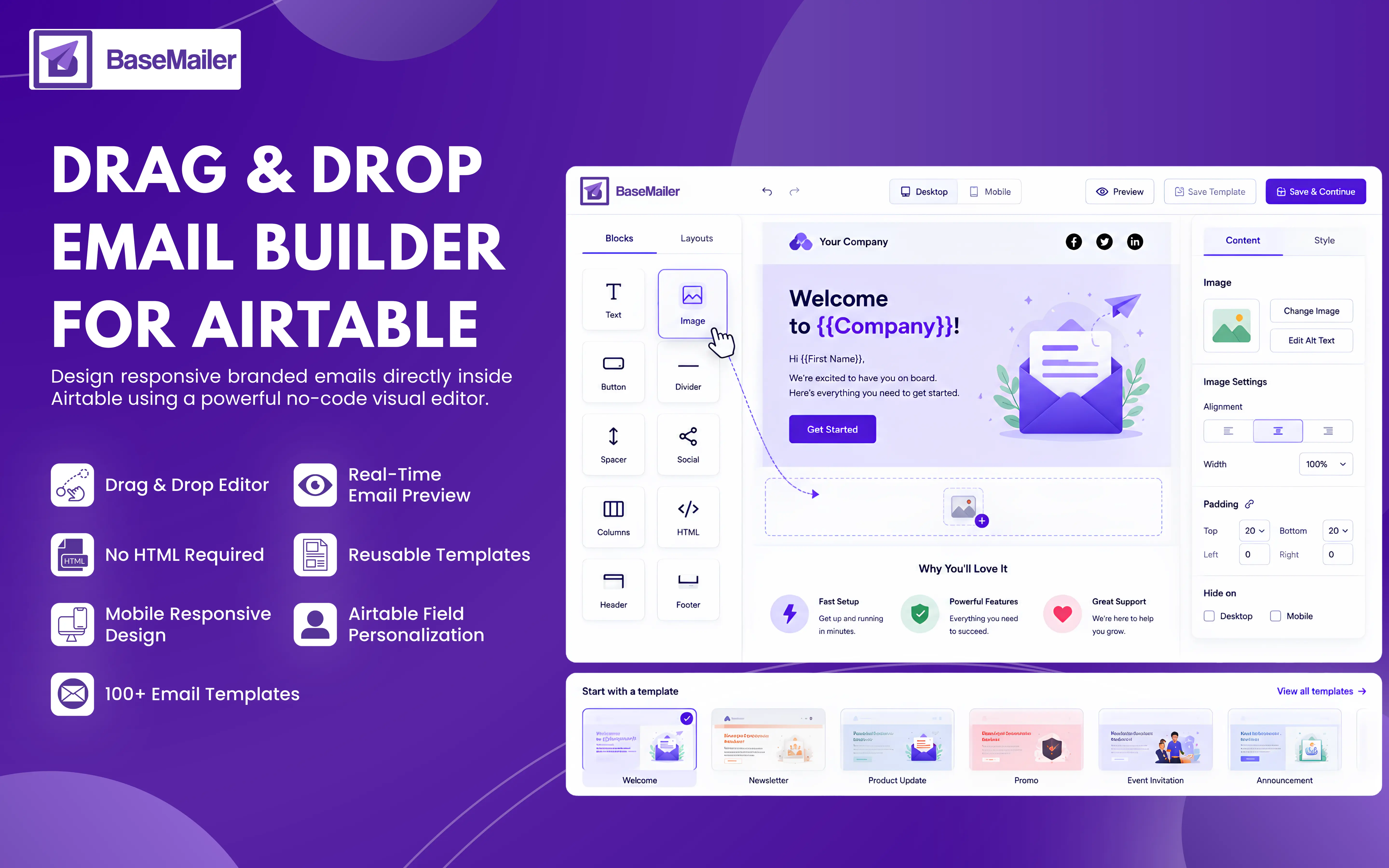
What Is a Drag and Drop Email Builder?
A drag and drop email builder is a user-friendly tool that allows you to create emails by simply moving text, images, buttons, and dividers into place. Moreover, you don’t need any HTML coding or design skills to get started.
Unlike traditional email methods that require you to import or export contact data, Basemailer operates seamlessly within Airtable. It can access your contacts, design emails, and send them all in one go.
Build email faster with Airtable email builder!
Getting started with the drag and drop email builder is quick, as creating emails takes less than a minute! Just install the extension, open it in the Airtable email builder, and you’re ready to create professional emails without the hassle of coding. Here’s a simple step-by-step guide:
- 1
Open Airtable Email builder
Launch Basemailer directly from the Airtable email builder. This drag and drop email builder opens right inside your Basemailer, giving you instant access to your contacts and previous campaigns.
- 2
Start with a Template Or Blank Canvas
Choose from over 100+ professionally designed email templates or customize an email from scratch. Whether you’re looking to craft newsletters, follow-ups, announcements, or outreach campaigns, there are plenty of templates available to help you hit the ground running.
- 3
Designing with drag & drop simplicity
Build stunning emails by simply dragging the content blocks to their perfect place. Then, add the texts, images, buttons, social icons, dividers, and multi-column layouts, headers, and footers, all without touching the HTML.
- 4
Personalize every email with Airtable data
Insert the dynamic Airtable fields, such as the first name, the company, plan type, or custom field, directly into your subject lines. Then, every recipient will receive the personalized email automatically.
- 5
Preview, Save & Send
Preview your emails across desktop and mobile devices before sending. Also save designs as reusable templates or launch campaigns directly from the Airtable in just a few clicks.
Key Features of the Drag and Drop Email Builder!
Build Emails Without HTML
Easily create stunning, branded emails with our user-friendly visual editor. Tweak colors, fonts, spacing, buttons, and layouts with just a few clicks with no coding skills required!
Mobile-Responsive by Default
Every email automatically adapts to desktop, tablet, and mobile screens. Your marketing campaigns will look polished and professional on every single screen.
Real-Time Email Preview
See the exact way your email will appear before the end audience. Switch between desktop and mobile screens to instantly ensure every detail is perfect.
Native Airtable Integration
Unlike traditional email platforms, BaseMailer works directly inside Airtable. Access records, contact lists, and field values without exporting data or managing syncs.
Reusable Email Templates
Save high-performing email designs and reuse them whenever needed. Maintain consistency across campaigns while reducing design time.
Brand Consistency Made Easy
Keep every email on-point with reusable colors, logos, fonts, and design elements. Creating a consistent customer experience across every campaign.
100+ Ready-to-Use Templates
Get started faster with an email templates option for newsletters, product launches, customer updates, follow-ups, promotions, and more.
Perfect For Email Marketers, Sales Teams & More!
Airtable Teams
Manage contacts, create emails, and track campaigns from Airtable’s Basemailer effortlessly.
Email Marketers
Build personalized email marketing campaigns faster while maintaining the interactive design and branding style.
Small Businesses
Turn Airtable into a complete email marketing platform without investing hefty money in additional software.
Sales Teams
Send personalized outreach emails while using Airtable data and dynamic fields for better engagement.
Why Choose Basemailer Over Traditional Email Tools?
Most of the email tools make you jump between platforms to manage contacts, create emails, and analyze analytics.
With Basemailer, everything happens inside Airtable - email template builder, automation, and analytics all in a streamlined workflow.
| Feature | BaseMailer | Other Tool |
|---|---|---|
| Works inside Airtable | Yes | No |
| No CSV export needed | Yes | No |
| Dynamic field variables | Airtable fields | Limited |
| Real-time analytics in Airtable | Yes | Separate dashboard |
| Coding required | Never | Sometimes |
| Built-in template library | 100+ templates | Varies |
Frequently Asked Questions
Do I need specific coding skills to use the email builder?
Can I create personalized emails from the Airtable data?
Are emails mobile-friendly?
Can I save & reuse the same email templates?
How does Basemailer differentiate from MailChimp or SendGrid?
Start building beautiful emails inside Airtable
Install BaseMailer and design your first responsive, on-brand email in under a minute — no code, no exports, no extra tools.