Airtable Email Integration For Smart Automation!
Every new lead deserves a welcome email.
Every closed deal needs a confirmation email.
Every upcoming renewal should trigger a reminder email.
The problem? Those emails often depend on someone remembering to send them.
With BaseMailer, your emails are triggered automatically by what's happening inside Airtable.
When a new record is created, a status changes, or a date arrives, BaseMailer sends the right email instantly, personalized with data from your Airtable fields and delivered without any manual work.
What Is Airtable Email Integration?
Automate Emails From Airtable With Powerful Workflow!
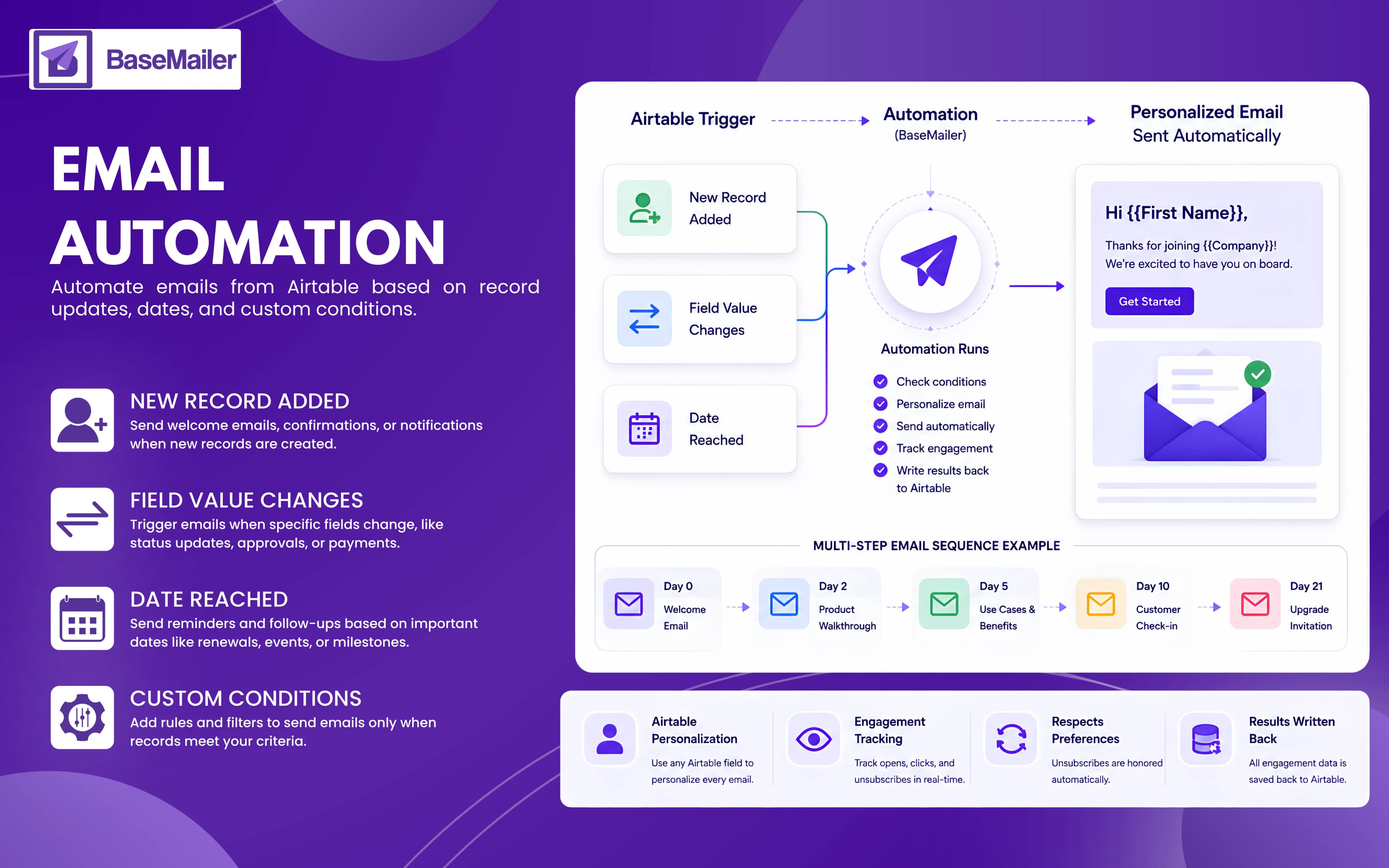
Airtable email integration allows emails to be sent automatically when specific events occur in your Airtable base.
As you immediately define the rules once, BaseMailer handles the rest of email work.
Trigger emails when:
- New records are created
- Field values change
- Statuses are updated
- Dates are reached
- Custom conditions are met
BaseMailer brings email automation directly into Airtable. Your Airtable data powers both the trigger logic and the email personalization, keeping everything in one place.
The result is a fully automated Airtable email workflow that responds to real-time changes in your data, delivers personalized messages at exactly the right moment, and scales effortlessly.
How Email Automation Works in BaseMailer?
Email automation in BaseMailer follows a simple principle: When something happens in Airtable, the right email gets sent automatically:
- 1
Choose Triggers
Every automation begins with a trigger, the Airtable event that starts the workflow.
New Record Added
Trigger emails when a new record is created in your table.
Perfect for:
- Welcome emails
- Lead response emails
- Customer onboarding
- Booking confirmations
- New order notifications
Field Value Changes
Trigger emails when a field changes to a specific value.
Examples:
- Deal Status → Closed Won
- Stage → Onboarding
- Approval Status → Approved
- Payment Status → Overdue
- Support Ticket → Resolved
This Airtable trigger emails type allows your email automation to follow the exact workflow your team already uses inside Airtable.
Date Reached
Trigger emails based on dates stored in Airtable.
Examples:
- 14 days before renewal
- 7 days after signup
- On a contract expiry date
- 1 day before an event
- 30 days after purchase
BaseMailer continuously checks your Airtable records and automatically sends emails when the defined date conditions are met.
- 2
Add Conditions for Precision
Not every trigger should send an email.
BaseMailer lets you define rules and conditions so automations only fire when records meet your criteria.
For example:
- Only send if Plan = Pro
- Only trigger if the status changed from "In Progress"
- Exclude contacts marked as Unsubscribed
- Only send to customers in a specific region
- Only trigger when a deal value exceeds a threshold
This ensures every email is relevant, timely, and targeted.
- 3
Design the Email Once
Create your email using BaseMailer's drag-and-drop builder.
Then personalize it using Airtable fields such as:
- First Name
- Company Name
- Plan Type
- Renewal Date
- Account Manager
- Any custom field in your base
Every recipient receives a version tailored to their Airtable record automatically.
No manual editing. No copying and pasting. No repetitive work.
- 4
Send a Single Email or Build a Sequence
Single Email Automation
One trigger sends one email immediately.
Example:
New lead added → Welcome email,
Simple, instant, and fully automated.
Multi-step Airtable Drip Email Sequence
One trigger can also launch a complete email journey.
Example onboarding sequence:
- Day 0 → Welcome email
- Day 3 → Product setup guide
- Day 7 → Best practices and tips
- Day 14 → Customer success check-in
- Day 21 → Upgrade or upsell offer.
You choose the timing between emails. BaseMailer handles the delivery automatically.
- 5
Turn It On and Let It Run
Once activated, BaseMailer continuously monitors your Airtable data.
When a trigger condition is met:
- The email is personalized using Airtable fields
- The email is delivered automatically
- Opens and clicks are tracked
- Unsubscribes are respected automatically
- Results are written back to Airtable
You can pause, edit, or disable any automation whenever needed.
Powerful Automation Triggers for Every Workflow!
New Record Added
Automatically respond the moment new data enters Airtable.
Common use cases:
- Welcome new leads
- Confirm bookings and appointments
- Start onboarding sequences
- Send order confirmations
- Respond instantly to form submissions
The faster you follow up, the better your engagement and conversion rates.
Field Value Changes
Build automations around the status changes that drive your business.
Examples:
- Closed Won → Send customer confirmation
- Onboarding Started → Launch onboarding sequence
- Payment Overdue → Send reminder
Instead of adapting your workflow to an automation tool, BaseMailer adapts to the workflow you already run in Airtable.
Date Reached
Never miss another reminder, renewal, or milestone.
Automate emails from Airtable:
- Before subscription renewals
- Before contract expirations
- Before events and meetings
- After purchases
- After the onboarding milestones
Your emails arrive exactly when they should without anyone remembering to send them.
Multi-Step Drip Sequences That Run Themselves!
A single trigger can start an entire customer journey.
For example:
- Day 0 → Welcome email
- Day 2 → Product walkthrough
- Day 5 → Industry-specific use cases
- Day 10 → Customer check-in
- Day 21 → Upgrade invitation
Every email:
- Uses live Airtable data
- Is personalized automatically
- Includes open and click tracking
- Honors unsubscribe preferences
Set it up once and let the sequence run for every new contact automatically.
Why Use BaseMailer Instead of Zapier or Make?
Native Airtable Triggers
BaseMailer works directly with your Airtable data. Your emails are triggered by actual Airtable events, not third-party polling schedules.
Full Airtable Personalization
Use any Airtable field inside:
- Subject lines
- Email content
- CTAs
- Dynamic messaging
Every email feels personal because it's powered by real customer data.
Email Automation No Code Airtable
Build sophisticated automations using a visual interface. No developers. No scripts. No complex workflows.
Sequences Stay Synced with Airtable
Customer data changes all the time. BaseMailer is native to Airtable, automations can react to those changes in real time.
If a customer upgrades, changes status, or completes a goal, you can automatically adjust or stop future emails.
Built-In Tracking and Compliance
Every Airtable automated email campaigns includes:
- Open tracking
- Click tracking
- Bounce tracking
- Automatic unsubscribe handling
Popular Airtable Email Integration Use Cases!
Welcome & Onboarding
Automatically guide new users through your product with a personalized onboarding sequence that starts the moment they're added to Airtable.
Sales Pipeline Follow-Ups
Trigger follow-ups based on deal stage changes so opportunities never go cold.
Renewal & Subscription Reminders
Send reminder emails before renewals and contract expirations to reduce churn and improve retention.
Event & Booking Confirmations
Automatically confirm registrations, bookings, appointments, and event signups using information stored in Airtable.
Re-engagement & Review Requests
Reach out after purchases, onboarding milestones, or periods of inactivity to collect feedback, encourage reviews, and re-engage customers automatically.
BaseMailer Email Automation vs. Using Zapier + Email Tool
| Feature | BaseMailer | Zapier + Email Tool |
|---|---|---|
| Setup complexity | Built inside Airtable | Multiple tools + Zap config |
| Trigger: new record | Native | Via Zap |
| Trigger: field value change | Native | Via Zap |
| Trigger: date reached | Native | Limited/extra steps |
| If/then conditions | Built in | Requires filter steps in Zap |
| Multi-step drip sequences | Yes | Complex multi-Zap setup |
| Personalization from Airtable fields | Any field, natively | Manual field mapping |
| Open/click tracking in Airtable | Written back automatically | Not possible |
| Additional monthly cost | Included in BaseMailer | Zapier + tool fees |
Frequently Asked Questions
Do I need coding skills to set up email automations?
Can I create multi-step email sequences?
What Airtable events can trigger an email?
Can I personalize automated emails using Airtable data?
What happens if a contact unsubscribes?
Put your email follow-ups on autopilot
Set triggers, add conditions, design once, and let BaseMailer send the right personalized email the moment something changes in Airtable — single sends or full drip sequences.