Personalized Bulk Email Campaigns Made Easy!
With Basemailer, you can launch a personalized bulk email campaign straight from Airtable, no need to export contacts, juggle spreadsheets, or deal with complicated tools. It’s a breeze to create, customize, and send bulk email from Airtable.
Whether you’re sharing newsletters, reaching out for sales, or sending out event invites, Basemailer ensures your bulk email personalization is spot on.
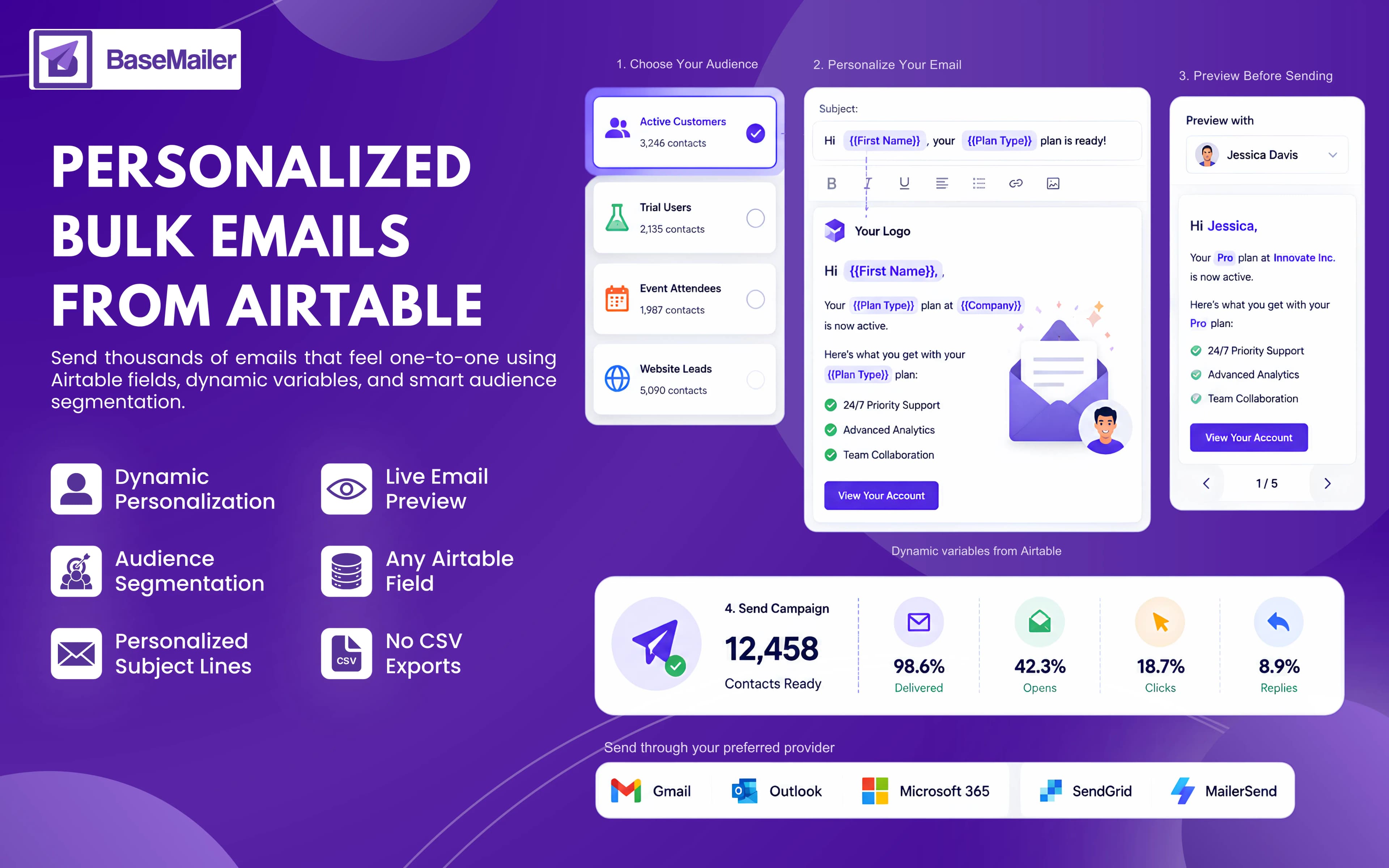
What Is Personalized Bulk Email?
A personalized bulk email is a campaign that reaches many recipients, but with a twist: the content is tailored to each individual.
Think about it like:
- First name
- Company name
- Subscription plan
- Event information
- Deal stage
- Custom Airtable fields
This method offers a much more engaging experience than old-school mass email blasts, often resulting in higher engagement and better response rates.
How Personalized Bulk Email Works With Basemailer?
BaseMailer's personalization engine seamlessly pulls data straight from your Airtable fields and merges it into your emails right when you hit send. This personalized bulk email workflow allows you to send relevant messages to each recipient without any manual hassle:
- 1
Your Contacts Live in Airtable
You can send bulk emails directly from an Airtable base that holds all your contact records. Whether it’s a CRM table, a leads database, a customer list, or an event registration table, it is not about exporting contacts to CSV files or importing them elsewhere.
- 2
Use Airtable Views to Segment Your Audience
One of the biggest advantages of running Airtable email campaigns is that segmentation stays intact.
Create filtered views such as:
- Active Customers
- Website Leads
- Event Attendees
- Trial Users
BaseMailer sends only to the records contained in the selected view, eliminating duplicate lists.
- 3
Insert Dynamic Field Variables
Basemailer is an advanced email merge from Airtable. Besides, inside the drag-and-drop builder, you can insert Airtable fields such as:
- {First Name}
- {Company}
- {Plan Type}
- {Deal Stage}
Meanwhile, while sending, these placeholders are automatically replaced with each contact's information.
You can use variables throughout your email:
- Subject lines
- Opening greetings
- Body copy
- CTA buttons
- Personalized links
- Preview text
- 4
Personalize the Subject Line
Subject line personalization remains one of the most effective forms of bulk email personalization.
As BaseMailer supports Airtable variables in subject lines, every recipient can see a customized subject that references their name, company, or other relevant details.
- 5
Preview Personalization Before Sending
Before sending emails, preview every email using actual Airtable records.
It lets you review fully personalized versions of your campaign and catch formatting or data issues before delivery.
Personalized Mass Email From Airtable Can Change Everything!
Every Airtable Field Becomes a Personalization Variable
Most email tools support only a handful of merge tags. As an Airtable bulk email sender, BaseMailer gives you access to virtually every field in your base, including:
- Custom fields
- Formula fields
- Lookup fields
- Rollups
- Linked record names
If the data exists in Airtable, it can be used for personalization.
Send at Scale Without Losing the Personal Touch
Whether you're emailing 50 contacts or 50,000, BaseMailer automatically personalizes each message using Airtable data.
No CSV Exports or Manual Mail Merge
Traditional mail merge workflows require multiple steps, including exporting contacts, uploading spreadsheets, and mapping fields.
BaseMailer removes those steps entirely by connecting directly to Airtable and keeping your contact data live at all times.
Works with Gmail, Outlook, and SMTP Providers
Personalized bulk emails can be sent through:
- Gmail & Google Workspace
- Outlook & Microsoft 365
- SMTP providers like SendGrid and MailerSend
The personalization process works the same regardless of the provider.
Use Cases - Send Personalized Bulk Email With Basemailer!
Newsletters
BaseMailer is a fantastic tool for content teams and businesses. Each subscriber gets content that’s tailored just for them, based on their name, preferences, location, or subscription details.
Cold Outreach & Sales Emails
Sales teams can leverage BaseMailer to launch personalized bulk email campaigns right from Airtable. These emails can mention a prospect's company, industry, role, or interests, making the outreach feel much more relevant and personal.
Transactional-Style Updates
You can easily send onboarding emails, renewal reminders, account updates, and customer notifications using data from Airtable. Each message is automatically personalized with the right details for every recipient.
Event Invitations & RSVPs
Event organizers also find BaseMailer useful for sending out personalized invitations, RSVP reminders, and follow-ups. With Airtable views, it’s a breeze to segment attendees and customize your communication.
Personalized Bulk Email: BaseMailer vs. Other Traditional Tools!
| Feature | BaseMailer | Mailchimp / SendGrid |
|---|---|---|
| Personalize from any Airtable field | Any field | Limited merge tags only |
| Personalized subject lines | Yes | Yes |
| Conditional content by field value | Yes | Paid plans only |
| No CSV export required | Live Airtable data | Export required |
| Segmentation via Airtable views | Native | Rebuild a tool |
| Sends from your own Gmail / Outlook | Yes | Their domain |
| Real-time results back in Airtable | Yes | Separate dashboard |
Frequently Asked Questions
What Airtable fields can I use as personalization variables?
Can I personalize emails with subject lines?
How many emails can I send at once?
Can I track opens and clicks?
What happens if a personalization field is empty?
Send bulk email that feels one-to-one
Launch your first personalized campaign straight from Airtable — merge any field, segment with views, and preview every message before it sends. No CSV exports, no mail merge.